Belkin USB-C Dock Pro Review: Is This 11-in-1 Dock Worth It for Remote Work?
The Belkin Connect 11-in-1 Universal USB-C Pro Dock is built for laptop users who want a cleaner workstation, more monitor options, wired Ethernet, SD card access, and laptop charging through one USB-C connection. It is not the cheapest dock, and it is not a full Thunderbolt 4 workstation hub, but it can make sense for remote workers who need broad compatibility rather than maximum pro-level bandwidth.
The Belkin USB-C Dock Pro is a strong fit if you want a compact all-in-one dock for a Mac, Windows, or Chromebook laptop setup with multiple displays, 100W USB-C Power Delivery, 2.5Gb Ethernet, and legacy ports. Skip it if you specifically need Thunderbolt 4 speeds, 10Gb Ethernet, or a dock for a high-end creative workstation with heavy external storage use.
Who is the Belkin USB-C Dock Pro actually for?
The Belkin USB-C Dock Pro is mainly for people who work from a laptop but want their desk to behave more like a fixed workstation. That means one cable to connect monitors, keyboard, mouse, Ethernet, storage cards, audio, and power instead of rebuilding the setup every time the laptop returns to the desk.
Its strongest use case is a hybrid or home office setup where convenience matters as much as raw speed. The dock is especially relevant if your laptop lacks HDMI, Ethernet, SD card slots, USB-A ports, or enough display outputs for your current monitors.
The main caution is expectation management. This is a broad USB-C docking solution, not a premium Thunderbolt 4 dock like the CalDigit TS4. For general productivity, calls, office apps, cloud work, browsing, spreadsheets, and multi-monitor desk use, that distinction may not matter. For high-bandwidth creative workflows, it can.
Quick answer: should you buy the Belkin USB-C Dock Pro?
Buy the Belkin USB-C Dock Pro if you want a compact 11-in-1 USB-C dock that can simplify a laptop workstation with charging, display outputs, Ethernet, SD card access, and older ports in one device. It is most compelling for remote workers, consultants, students, and office professionals who want a cleaner desk without paying for a high-end Thunderbolt 4 dock.
Buy it if
- You want one cable between your laptop and desk setup.
- You need HDMI, DisplayPort or VGA flexibility.
- You value 100W laptop charging from the dock.
- You want faster-than-gigabit wired Ethernet.
- You use SD or microSD cards occasionally.
Skip it if
- You specifically need Thunderbolt 4 performance.
- You rely on 10Gb Ethernet or heavy external SSD workflows.
- You only need a basic USB-C hub for one monitor.
- You want the lowest-cost dock possible.
- Your monitor setup requires confirmed Mac-specific multi-display behavior.
Belkin USB-C Dock Pro specs snapshot
| Product | Belkin Connect 11-in-1 Universal USB-C Pro Dock |
|---|---|
| Best use case | Remote work, hybrid work, laptop workstation, desk cleanup, multi-peripheral setup |
| Host connection | USB-C |
| Charging | Up to 100W USB-C Power Delivery to the host laptop |
| Display outputs | 2 HDMI ports, 1 DisplayPort, 1 VGA port |
| Network | 2.5Gb Ethernet |
| USB ports | USB-C and USB-A connectivity for peripherals and accessories |
| Card readers | SD and microSD slots |
| Audio | 3.5mm audio in/out |
| Compatibility | Designed for compatible USB-C, Thunderbolt 3, and Thunderbolt 4 laptops across Mac, Windows, and Chrome devices |
| Main limitation | Not a true Thunderbolt 4 dock; display behavior can depend on laptop, OS, drivers, and monitor configuration |
Belkin USB-C Dock Pro images and setup context
The Belkin dock is designed as a compact workstation base rather than a large desktop hub. These existing WordPress images should be reused to show the port layout, laptop stand format, and real desk integration.
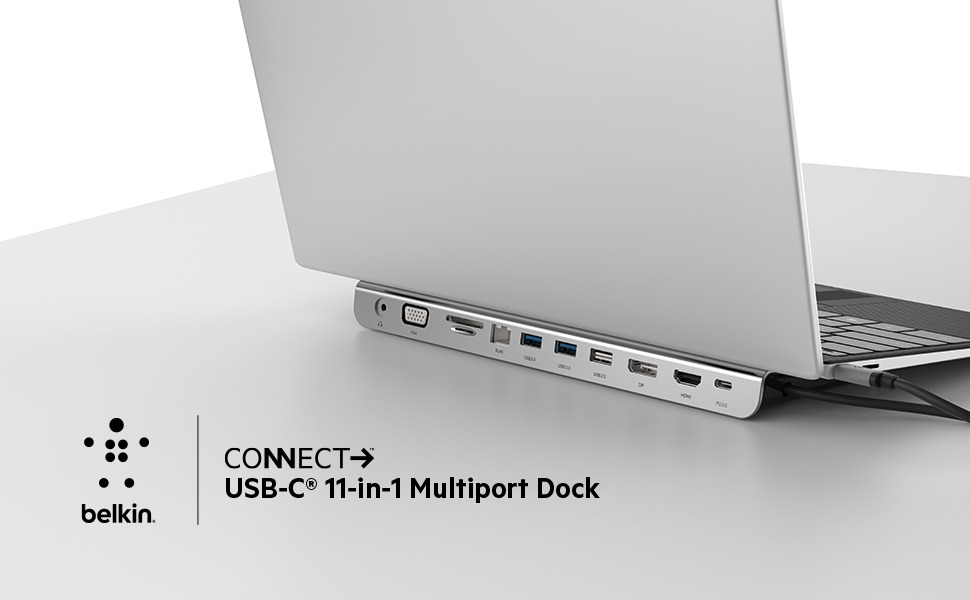
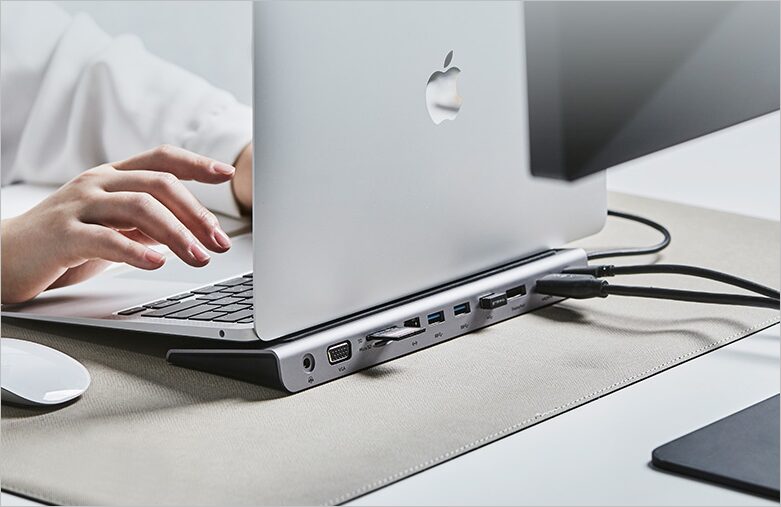
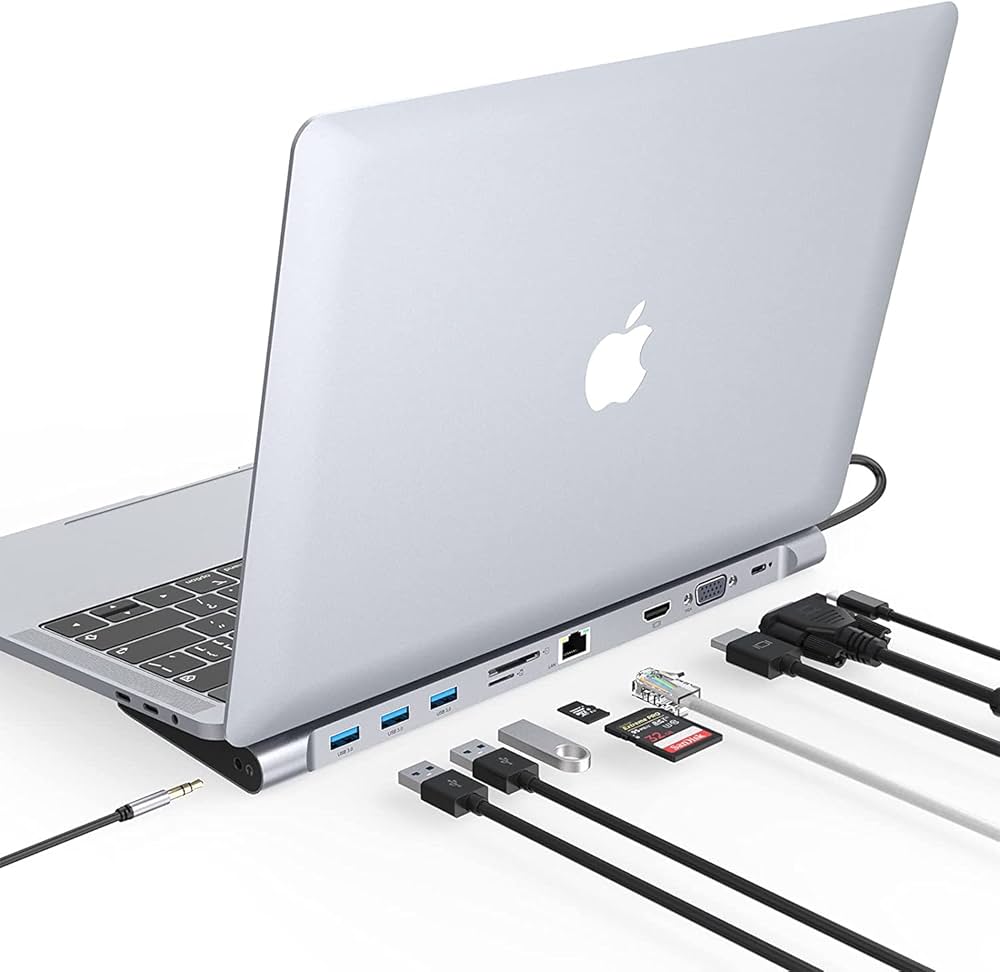
What makes the Belkin USB-C Dock Pro different?
The Belkin USB-C Dock Pro is not trying to be the most powerful dock in the category. Its real value is coverage: it combines modern USB-C laptop charging with older and newer connection types that still matter in real office setups.
That makes it useful for people who move between laptop-only work and a fixed desk setup. Instead of connecting a charger, HDMI cable, Ethernet adapter, keyboard receiver, SD card reader, and audio cable separately, the Belkin dock centralizes most of that through one USB-C connection.
11-in-1 port coverage
The main advantage is practical connectivity. The dock covers display outputs, Ethernet, USB peripherals, card readers, audio, and charging in one compact unit.
100W Power Delivery
The dock can deliver up to 100W USB-C Power Delivery to a compatible laptop, which is enough for many business laptops, MacBooks, Chromebooks, and productivity machines.
2.5Gb Ethernet
The 2.5Gb Ethernet port gives it a stronger wired-network spec than basic gigabit docks, provided your router, switch, cable, and internet or local network can actually use that speed.
Legacy display flexibility
HDMI, DisplayPort, and VGA support make it more flexible for offices, meeting rooms, older monitors, and mixed setups than docks that only assume modern USB-C or HDMI displays.
The key buying point
The Belkin dock is best understood as a workstation simplifier. It is less about maximum bandwidth and more about reducing cable friction for everyday laptop users.
How well does the Belkin USB-C Dock Pro fit a home office setup?
For a home office, the Belkin USB-C Dock Pro fits best when your desk has several accessories that need to stay connected permanently: one or more monitors, a wired keyboard, a mouse receiver, external speakers or headset, Ethernet, and occasional SD card use.
The compact footprint is a strength. It can sit behind a laptop, under a monitor stand, or near the edge of the desk without taking over the workspace. For DeskZen readers, that matters because a dock is not only a technical accessory; it also affects desk cleanliness and daily workflow.
The integrated USB-C connection also reduces daily setup time. If you use your laptop in meetings, on the sofa, or while traveling, returning to the desk becomes simpler: connect the dock cable, and your workstation is mostly restored.
What are the main performance expectations?
For everyday office work, the Belkin USB-C Dock Pro should be judged on stability, convenience, charging, display support, and port availability rather than gaming-grade refresh rates or professional media bandwidth.
It is suitable for productivity workloads such as browser work, spreadsheets, email, project management tools, video calls, online dashboards, light file transfers, and general multi-monitor use. It is less compelling for workflows built around large video files, high-speed RAID storage, color-critical monitor chains, or high-refresh displays.
| Area | What to expect | DeskZen buying note |
|---|---|---|
| Charging | Up to 100W USB-C Power Delivery for compatible laptops. | Good for many productivity laptops, but check your laptop’s required wattage. |
| Displays | Multiple display outputs through HDMI, DisplayPort, and VGA. | Monitor behavior can depend on laptop model, OS, drivers, and display configuration. |
| Network | 2.5Gb Ethernet support. | Useful only if the rest of your network setup supports faster-than-gigabit speeds. |
| USB accessories | Suitable for keyboard, mouse, webcam, headset dongles, and general peripherals. | Good for desk organization; not a substitute for a high-end Thunderbolt storage workflow. |
| Card readers | SD and microSD access for occasional file import. | Convenient for creators, cameras, drones, and field devices, but not the main reason to buy it. |
Important compatibility caution
Multi-monitor support should always be checked against your exact laptop and operating system. USB-C docks can behave differently across Windows laptops, Intel Macs, Apple Silicon Macs, Chromebooks, and systems requiring DisplayLink drivers.
Is the Belkin USB-C Dock Pro good for MacBook users?
The Belkin USB-C Dock Pro can be a useful MacBook dock if your priority is port expansion, wired Ethernet, charging, and a cleaner desk setup. It is especially relevant for MacBook Air or MacBook Pro users who lack built-in HDMI, Ethernet, USB-A, or card slots.
The main point to verify is display behavior. MacBooks, especially Apple Silicon models, can have restrictions around the number of external displays they support natively. A dock cannot always override those hardware and software limits without specific driver-based display technology.
For a single external monitor plus Ethernet, USB accessories, and charging, the Belkin dock is straightforward. For complex dual- or triple-monitor Mac setups, confirm compatibility before purchase.
MacBook buying note
Do not buy any USB-C dock for a MacBook based only on the number of display ports. Check whether your specific MacBook model supports the monitor count and resolution you want.
Is the Belkin USB-C Dock Pro good for Windows laptops?
Windows laptops are often the best fit for this type of USB-C dock, especially business laptops from Dell, Lenovo, HP, Microsoft, ASUS, and Acer. Many Windows machines support broad USB-C docking behavior, external displays, Ethernet, USB peripherals, and Power Delivery through a single port.
The most important check is whether your laptop’s USB-C port supports video output and charging. Some budget laptops include USB-C ports that handle data only, which limits what any dock can do.
If your Windows laptop supports USB-C DisplayPort Alt Mode and USB-C charging, the Belkin dock becomes a practical desk upgrade for office productivity.
Where does the Belkin dock fall short?
The Belkin USB-C Dock Pro is not the right choice if you are buying for maximum professional throughput. It does not replace a high-end Thunderbolt 4 dock for users who move large media files, run multiple fast external drives, or need the strongest downstream Thunderbolt expansion.
It is also more dock than some users need. If your setup is only one HDMI monitor, one USB receiver, and charging, a smaller and cheaper USB-C hub may be enough.
Finally, multi-monitor claims require caution. Dock specs describe capability, but your actual results depend on the laptop, graphics support, cable quality, monitor resolution, refresh rate, and sometimes driver setup.
Not Thunderbolt 4-class
It offers broad USB-C docking, not the same performance profile as a premium Thunderbolt 4 dock such as the CalDigit TS4.
Overkill for simple setups
If you only need one monitor and a few USB ports, a smaller USB-C hub may be more cost-effective.
Display compatibility varies
The number of display ports does not guarantee your specific laptop can drive every monitor combination.
Limited upgrade path
If you expect to build a high-end creative desk later, starting with Thunderbolt 4 may be more future-proof.
Customer review trends: what buyers tend to care about
Customer reviews can change over time, so this section should be treated as a synthesis of recurring buyer feedback patterns rather than fixed ratings or individual testimonials.
1. Buyers like the one-cable desk setup
A recurring positive theme is convenience. Buyers often value being able to reconnect a laptop to monitors, accessories, Ethernet, and power through one USB-C connection.
2. Port variety is a major selling point
The mix of HDMI, DisplayPort, VGA, Ethernet, USB, audio, SD, and microSD gives the dock appeal for people with older accessories or mixed office equipment.
3. Display behavior is the main caution
As with many USB-C docks, some buyer concerns tend to involve monitor detection, resolution limits, driver needs, or setup-specific display behavior.
4. Value depends on your laptop
Buyers get the most value when their laptop fully supports USB-C video output, charging, and docking. On limited USB-C ports, the dock’s potential is reduced.
Belkin USB-C Dock Pro pros and cons
Pros
- Broad 11-in-1 port selection for laptop workstations.
- Up to 100W USB-C Power Delivery for compatible laptops.
- 2.5Gb Ethernet is stronger than basic gigabit docking specs.
- Useful display flexibility with HDMI, DisplayPort, and VGA.
- SD and microSD readers add practical everyday utility.
- Compact enough for clean home office setups.
- Good fit for hybrid workers who dock and undock often.
Cons
- Not a true Thunderbolt 4 dock.
- Actual display support depends on laptop and operating system.
- May be more expensive than basic USB-C hubs.
- Overkill if you only use one monitor and a few accessories.
- Not ideal for high-bandwidth creative or storage-heavy workflows.
- Mac multi-display buyers need to verify compatibility carefully.
- Network speed benefit depends on your router and local network setup.
Belkin USB-C Dock Pro vs Plugable vs CalDigit TS4: which one should you buy?
The Belkin USB-C Dock Pro sits between basic USB-C hubs and premium Thunderbolt docks. It makes the most sense if you need strong everyday port coverage without paying for a full Thunderbolt 4 workstation dock.
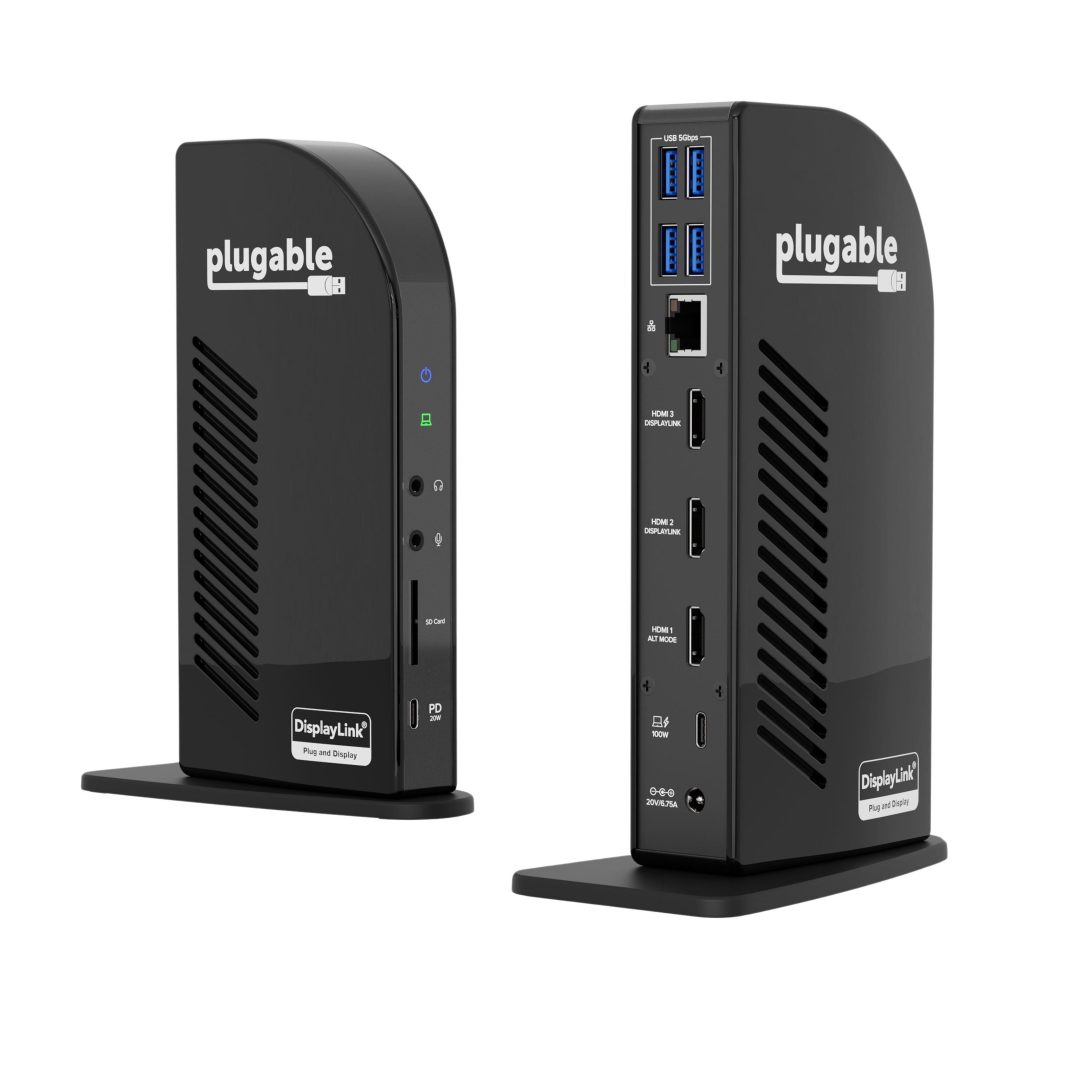
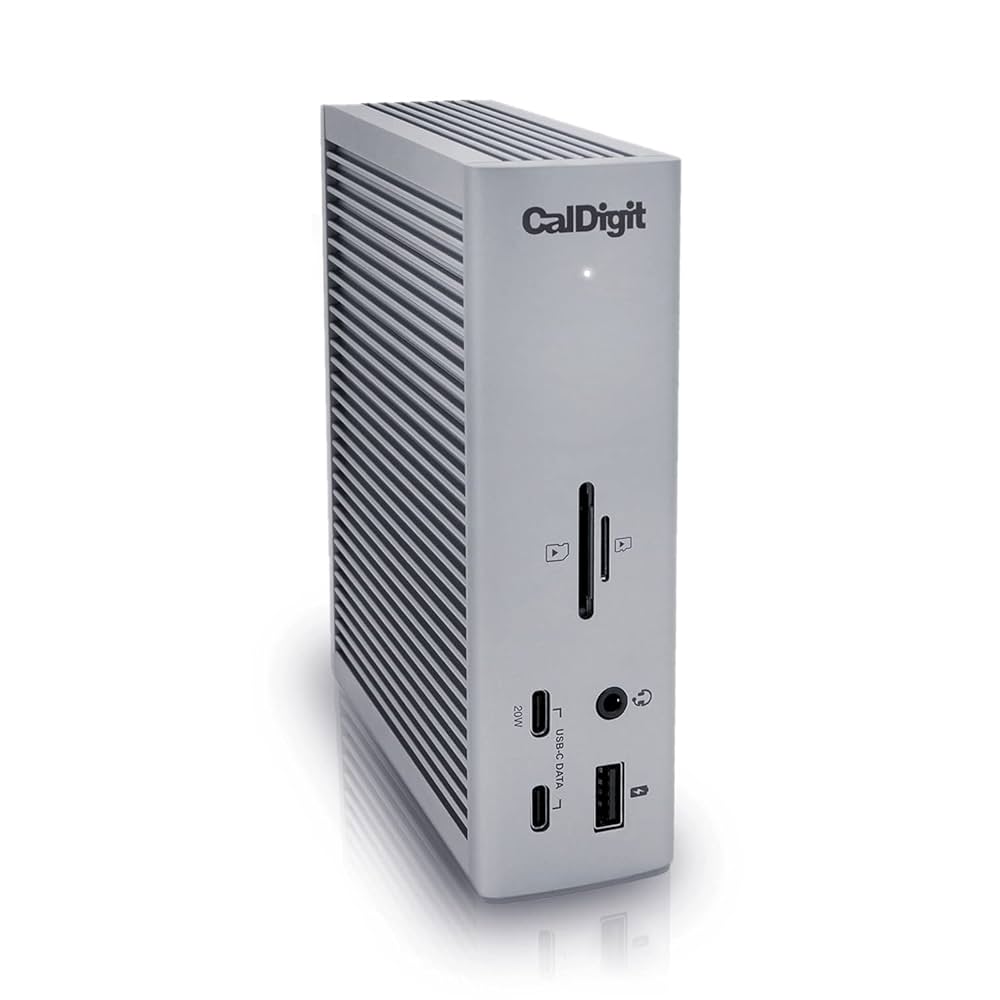
The Plugable UD-ULTCDL is more appealing if your priority is a triple-monitor Windows-style productivity setup and you are comfortable with a more specialized docking solution. The CalDigit TS4 is the premium option if you want a Thunderbolt 4 dock with more professional expansion, stronger long-term value, and a better fit for demanding creative setups.
| Dock | Best for | Why choose it | Main caution |
|---|---|---|---|
| Belkin Connect 11-in-1 USB-C Pro Dock | Balanced laptop workstations | Good mix of USB-C charging, Ethernet, display outputs, USB ports, audio, and SD/microSD readers. | Not Thunderbolt 4-class; monitor behavior depends on your laptop and OS. |
| Plugable USB-C Triple Monitor Docking Station UD-ULTCDL | Triple-monitor productivity setups | Useful if your main priority is building a multi-monitor office desk around a Windows laptop. | More setup-specific; buyers should check driver and display compatibility before purchase. |
| CalDigit TS4 Thunderbolt 4 Dock | Premium Thunderbolt workstations | Better fit for demanding users who want higher-end expansion, more future-proofing, and stronger pro-desk potential. | Costs more and may be unnecessary for standard office productivity. |
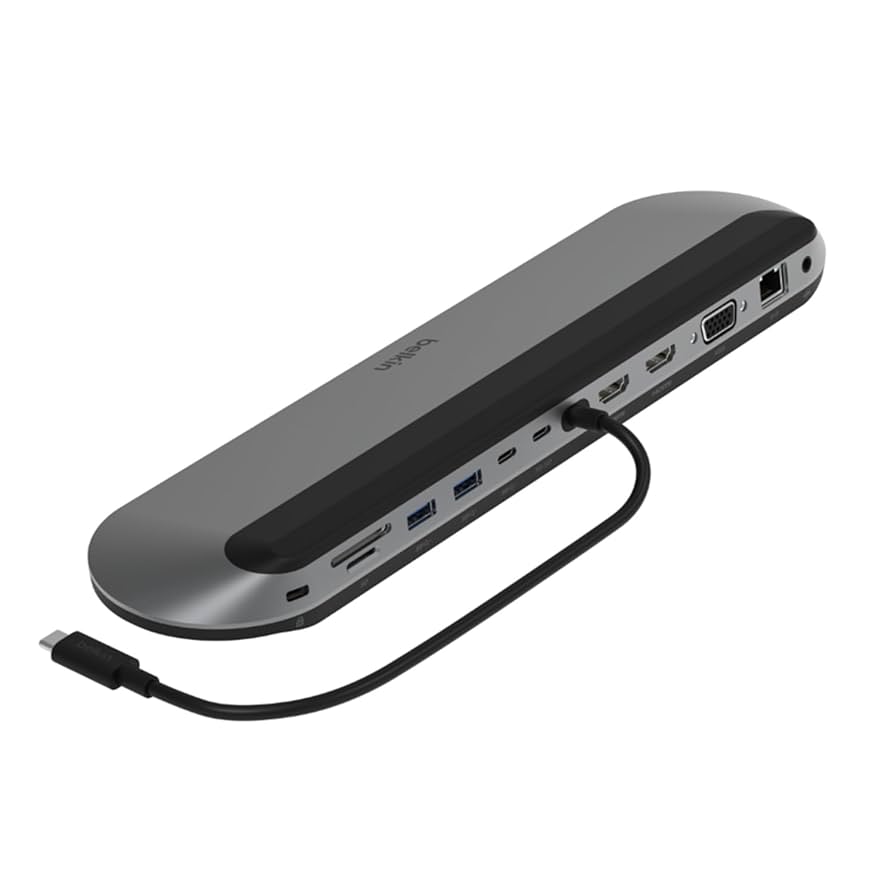
Best alternatives to the Belkin USB-C Dock Pro
These alternatives should stay in the article because they help the reader understand whether the Belkin dock is the right level of product or whether a more specialized dock makes more sense.
Check price on Amazon
Check price on Amazon
Check price on Amazon
Which dock is best for your setup?
Choose Belkin if you want the best balanced USB-C dock
The Belkin is the safest middle-ground choice if your desk has mixed accessories and you want one dock that handles charging, displays, Ethernet, USB devices, audio, and card readers.
Choose Plugable if triple-monitor productivity is the priority
The Plugable option is better if your main goal is adding several external displays to a Windows productivity station and you are willing to check driver and display requirements carefully.
Choose CalDigit TS4 if you want a premium Thunderbolt dock
The CalDigit TS4 is the better long-term purchase if you want Thunderbolt 4 expansion, a more professional desk setup, and stronger support for demanding creative accessories.
Choose a basic USB-C hub if your setup is simple
If you only need one HDMI monitor, a few USB ports, and occasional charging, the Belkin may be more dock than you need. A smaller USB-C hub may be enough.
Final buying context: the Belkin dock is about desk simplification
The Belkin USB-C Dock Pro is most convincing when your laptop has become the center of your workday but your desk still needs to behave like a complete workstation. It solves a practical problem: too many cables, too many adapters, and too much friction every time you reconnect your laptop.
It is not the right product if you are chasing maximum pro-level bandwidth. But for remote work, admin-heavy productivity, consulting, hybrid office use, browser-based work, calls, and daily laptop docking, it provides a useful balance of ports and convenience.
Final verdict: is the Belkin USB-C Dock Pro worth it?
The Belkin USB-C Dock Pro is worth it if you want a compact, practical, and broadly compatible USB-C dock for a laptop-based workstation. Its value comes from reducing cable clutter and centralizing the desk essentials: power, display outputs, Ethernet, USB peripherals, audio, and card readers.
It is less compelling if you already know you need Thunderbolt 4 performance, high-end external storage bandwidth, or a premium workstation dock for creative production. In that case, the CalDigit TS4 is the more appropriate benchmark.
For most remote workers and office professionals, the Belkin dock sits in a useful middle position: more complete than a basic USB-C hub, less expensive and less specialized than a premium Thunderbolt dock, and practical enough to make a laptop desk feel more permanent.
Best buying recommendation
Buy the Belkin USB-C Dock Pro if your priority is a cleaner, more functional laptop workstation with strong everyday port coverage. Skip it if your setup is either very simple or clearly Thunderbolt-first.
View Belkin USB-C Dock Pro on AmazonHow we evaluated the Belkin USB-C Dock Pro
This DeskZen review evaluates the Belkin USB-C Dock Pro as a buying decision for remote workers, hybrid professionals, and laptop-based home office users. The analysis focuses on port coverage, charging capability, display flexibility, compatibility risks, desk organization, alternative docks, and whether the product solves a real workstation problem.
We do not present this article as a laboratory benchmark or hands-on stress test unless explicitly stated. Instead, the review is based on product specifications, visible product positioning, Amazon listing details, comparison with competing docking stations, and practical home office use-case analysis.
Because docking performance can vary by laptop, operating system, drivers, monitor resolution, refresh rate, and cable quality, readers should verify compatibility with their exact laptop model before purchasing.
FAQ: Belkin USB-C Dock Pro
Is the Belkin USB-C Dock Pro a Thunderbolt dock?
No. The Belkin USB-C Dock Pro is best treated as a USB-C docking station, not a full Thunderbolt 4 dock. It can work with compatible Thunderbolt laptops, but buyers who need Thunderbolt 4 performance should compare it with a premium option like the CalDigit TS4.
Can the Belkin USB-C Dock Pro charge a laptop?
Yes, the dock supports up to 100W USB-C Power Delivery for compatible laptops. Check your laptop’s charging requirement before buying, especially if you use a high-performance workstation laptop that needs more than 100W.
Does the Belkin USB-C Dock Pro support multiple monitors?
The dock includes multiple display outputs, including HDMI, DisplayPort, and VGA. However, actual monitor support depends on your laptop, operating system, GPU limits, drivers, cables, resolution, and refresh rate. MacBook users should verify their model’s external display limits carefully.
Is the Belkin USB-C Dock Pro good for MacBook Air or MacBook Pro?
It can be useful for MacBook users who need Ethernet, USB-A, HDMI or DisplayPort access, SD card readers, audio, and charging through one dock. The main caution is multi-monitor compatibility, especially on Apple Silicon MacBooks with external display restrictions.
Is the Belkin USB-C Dock Pro good for Windows laptops?
Yes, it can be a strong fit for compatible Windows laptops, especially business laptops that support USB-C video output and USB-C Power Delivery. Before buying, confirm that your USB-C port supports display output, charging, and the monitor setup you plan to use.
Who should skip the Belkin USB-C Dock Pro?
Skip it if you only need a very basic USB-C hub, if your laptop has a limited data-only USB-C port, or if your work requires Thunderbolt 4 speeds, high-end storage throughput, or a premium creative workstation dock.
Is the Belkin USB-C Dock Pro better than the CalDigit TS4?
Not for premium Thunderbolt workflows. The Belkin is better for buyers who want a balanced USB-C dock at a more practical level. The CalDigit TS4 is the stronger choice for users who need Thunderbolt 4 expansion, a more future-proof workstation, and higher-end creative desk support.
Is the Belkin USB-C Dock Pro worth it for remote work?
Yes, if your remote work setup includes multiple peripherals and you want one cable to reconnect your laptop to your desk. It is most useful for productivity users who value desk organization, Ethernet, charging, monitor access, and peripheral management.
Changelog: 2026-05-08T00:00:00-04:00 — Full DeskZen refresh for AEO, Google Helpful Content, Gemini Search readiness, affiliate CTA structure, comparison context, methodology, FAQ, and conversion clarity.

Leave a Reply
You must be logged in to post a comment.